
Users have access to swap their landing page default between Dashboard and Campaign List.
As a default, all users land on Dashboard when logging into POP Tracker and when navigating to different clients. However, users also have access to change this.
HOW TO CHANGE LANDING PAGE:
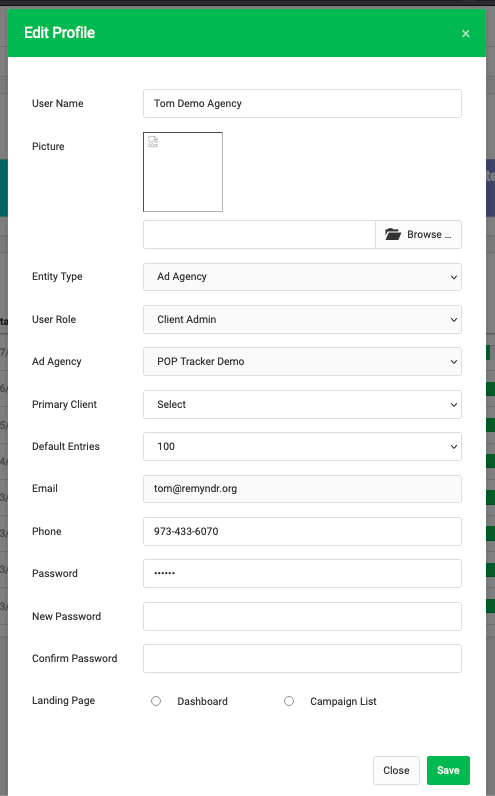
1. Log in and click on your name on the top right hand corner > My Profile
2. In popup, edit Landing Page selection. Check the box of the screen you prefer to land on.
3. Save and Refresh screen
WHY CHANGE LANDING PAGE:
If you find the Dashboard is where you will spend most of your time and where you can access the data you're looking for, select Dashboard as your landing page. Dashboard is great for viewing summaries and data analysis.
If you find the Campaign List is where you will spend most of your time and where you can access the data you're looking for, select Campaign List as your landing page. Campaign List is the most useful screen since most of the campaign management happens in the details.