
Docs

How can we help you?

Get help straight from the team at POP Tracker...

Re-Assign Images before creating a PPT report

Tips for Agency Users

Re-Assign Images before creating a PPT report

Before Creating a Report, reorganize your images to export in the proper image types. This user guide demonstrates how agency users can reorganize or reassign the image type for each photo so they appear in the slides accordingly.

Last updated on 26 Jul, 2023

Edit Image Types

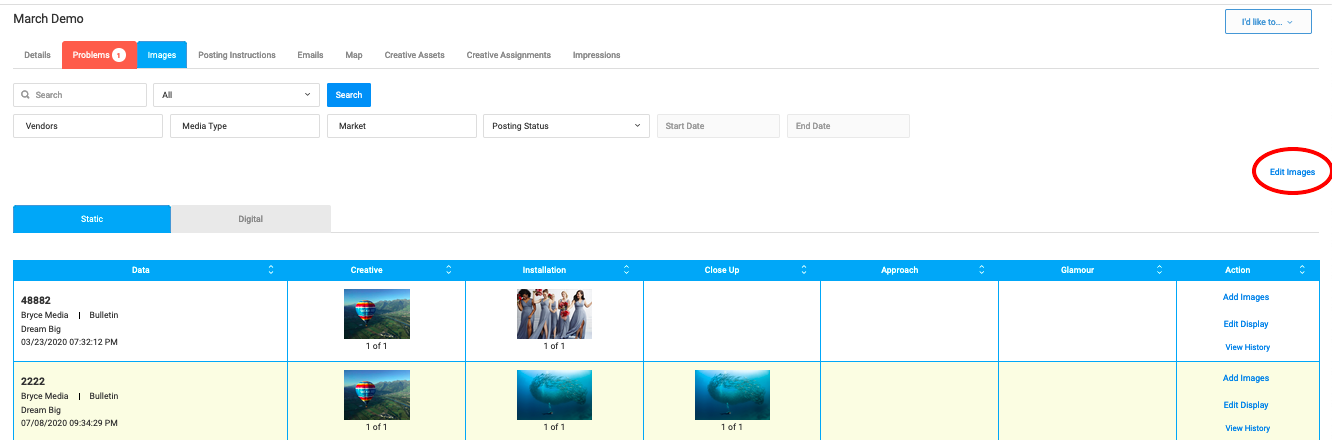
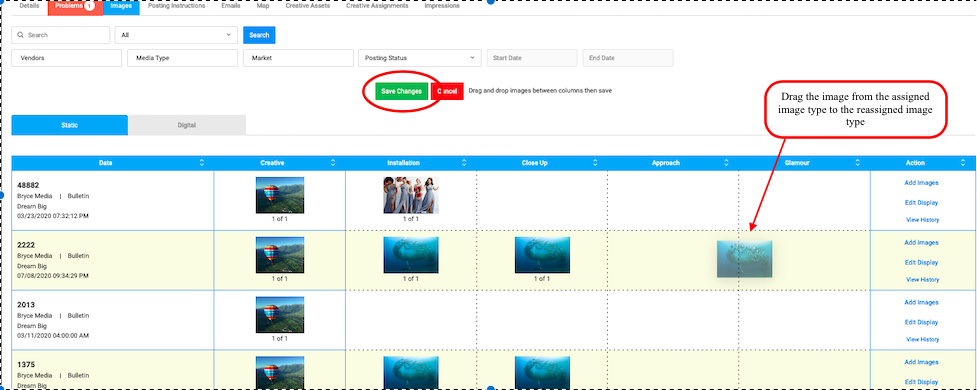
- Edit Images tool is great for reassigning images to different image types. For instance, if an image is under Installation image type, you can use this tool to move it to Close Up image type. This is a great tool to use before creating a report so each image exports to the slide as expected. 

How to Edit Image Types:

Open Campaign > click Images tab > click Edit Images > drag and drop the photos to the image type column accordingly > click Save at the top of the chart.
ImageImage


POP Tracker Support - support@mypoptracker.com

Image
Did you find this article helpful?
Previous

Troubleshooting Campaigns

Next